Complete Freedom Account + Visa Debit Card
You could get $50 cashback with our no-account-keeping fee, feature-packed Complete Freedom account. Read on to find out more.
Get $50 cashback on your new account
Open a new Complete Freedom account and an eligible savings account by 31st March 2027.
For new account holders who’ve not held a Bank of Melbourne Complete Freedom account or savings account in the past 2 years.
Once you meet the eligibility criteria, you could receive a one-time $50 payment into your new savings account.
Customers aged 18+ only. T&Cs apply#
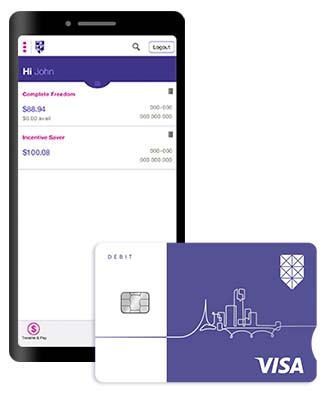
Freedom and control
Safer shopping with your Digital Card
It's a digital version of your debit card, available in the Bank of Melbourne App. Use it just like your physical card to shop online, pay bills, and set up your recurring card payments. The dynamic CVV refreshes in your App every 24 hours – making your card details even more secure and reduces the risk of fraudulent card activity by over 50%.
$0 international transfer fees
AUD $0 fee per transaction when you send foreign currency overseas via Internet Banking.
Internet and Mobile Banking
Manage your banking needs wherever you are with Internet Banking and features such as Quick Logon and Push notifications via the Mobile App. For more information please read Internet and Mobile Banking T&Cs (PDF 602KB).
You could get a minimum 10% electricity saving with One Click Switch
Compare and switch your electricity plan through One Click Switch between 18 June 2026 and 31 May 2028. Savings are calculated using your existing electricity usage from the past 12 months via Consumer Data Right (CDR). If your saving is less than 10%, the difference will be paid as a digital gift card, up to $500. Customers 18 years or older. T&Cs apply+. Must already hold a Bank of Melbourne debit card or credit card to be eligible.
Safe and secure banking
Card Lock
Instantly put your card on temporary lock if it's lost, stolen, or misplaced to reduce the risk of unauthorised transactions.
Notifications
Choose the alerts you want to receive to get push-notifications straight to your phone to monitor your account activity.
Fraud money back guarantee
We ensure that customers will be reimbursed for any unauthorised transactions provided that the customer has not contributed to the loss and contacted Bank of Melbourne promptly.3
Get rewarded for banking with us
Your Visa Debit Card gives you access to great offers and benefits from some of Australia's best-known brands as soon as you've activated your card.


Download the Bank of Melbourne App



The Detail
Read the Terms and Conditions (PDF 739KB), including for fees and charges that may apply, before making a decision and consider if it is right for you.
2. My Offers Hub is available to eligible consumer debit and credit card customers only.
This promotion runs from 9th June 2026 to 31st March 2027.
To be eligible you must:
- 18+ and have not held any transaction account or savings accounts with Bank of Melbourne in the last 2 years from the date the last transaction or savings account closure.
- Open a new Complete Freedom account AND, either a Incentive Saver OR Maxi Saver. Accounts must be in the same name, activated and ready to use.
- Make eligible purchases totalling at least $50 using the debit card linked to your account within 15 calendar days of the first account being opened. Transaction(s) must be processed (not pending) by the end of the 15th day.
- Transaction(s) must be customer-initiated and does not include interest payments, direct debits or internal transfers between your Bank of Melbourne accounts.
- Keep the account open for a minimum of 60 days after you meet all other eligibility criteria.
- Hold the accounts in one name only. These accounts cannot be joint accounts.
If you meet the above:
- You're eligible for a one-time $50 payment.
- The $50 payment will be made to your Incentive Saver OR Maxi Saver account within 60 days of you meeting all Terms and Conditions and eligibility criteria.
- If you open more than one Incentive Saver or Maxi Saver account, the $50 payment will only be made once into the first savings account opened and activated.
- This promotion may be varied or withdrawn at any time. It is not available in conjunction with any other offer unless otherwise stated.+ The BeMoved Promotion Terms and Conditions
This promotion runs from 1 June 2026 to 31 May 2028.
Eligibility criteria:
To be eligible for the BeMoved Promotion, you must meet all of the following criteria, you must:
- Be an active Bank of Melbourne customer, holding either:
- a Bank of Melbourne Transaction Account, or
- a Bank of Melbourne Credit Card
- Be 18 years or older
- Be the primary account holder for a residential electricity account
- Have been with your current electricity provider at the same supply address for at least 12 months + 1 day prior to comparison
- Have an estimated annual electricity bill of less than $5,000 AUD
- Have no registered life support equipment at the supply address
- Be located in NSW, VIC, SA, ACT, TAS, or South East QLD
- Successfully connect your electricity usage data via Consumer Data Right (CDR)
- Access One Click Switch through the Bank of Melbourne designated partner link or portal
Business accounts are not eligible. Bill uploads, manual data entry or quick estimates are not eligible for this offer.
Offer details
One Click Switch offer a minimum 10% saving on your estimated annual electricity costs when you compare and switch
Savings are calculated using your actual electricity usage data from the past 12 months, accessed via CDR
Savings are based on a comparison between:
your current electricity plan, and
the cheapest eligible plan available on the One Click Switch platform at the time of comparison
If the saving identified is less than 10%, a digital gift card will be issued to cover the difference, up to a maximum value of $500 AUD
If you choose to switch to a plan that is not the cheapest available plan, the saving (or payment) will still be calculated against the cheapest eligible plan
Things you should know
Savings are calculated at the time of comparison and are not affected by future price changes from your current or new provider
Temporary credits, rebates, concessions or one‑off bill adjustments are excluded from savings calculations
You must not cancel your switch, move premises, or change plans within 75 days of your electricity switch being completed
The switch must be successfully completed and accepted by the new provider (including ID and credit checks)
Any eligible gift card will be issued within 75 days of your switch submission being reconciled
Gift cards are issued via Prezzee and are not redeemable for cash
If CDR data is unavailable, incomplete, or prevents an accurate calculation (including certain tariffs or data errors), the offer will not apply
Only one claim per household or supply address per calendar year applies
This service is free to use; standard electricity plan charges and any applicable Bank of Melbourne account fees may apply
One Click Switch may verify eligibility and reserves the right to refuse payment where misuse or data manipulation is suspected.
Bank of Melbourne and One Click Switch may change or withdraw this offer at any time.Eligible switches already submitted before withdrawal will be honoured in accordance with these terms.
Read the Apple Pay Terms and Conditions (PDF 382KB) before making a decision and consider if it is right for you. To use Apple Pay you will need an eligible card and a compatible device with a supported operating system. See our Apple Pay FAQs for more information. Apple, the Apple logo, Apple Pay, Apple Watch and iPhone are trademarks of Apple Inc., registered in the U.S. and other countries. App Store is a service mark of Apple Inc.
Read the Google Pay Terms and Conditions (PDF 112KB) before making a decision and consider if it is right for you. To use Google Pay you will need to use a compatible device with a supported operating system. See our Google Pay FAQs for more information.
Read the Samsung Pay Terms and Conditions (PDF 29KB) before making a decision and consider if it is right for you. To use Samsung Pay you will need to use a compatible device with a supported operating system. See our Samsung Pay FAQs for more information.